

Report Data
2. Organization Structure Setup
2.6 Report Data
Designing reports is main function of our ERP, so we make it easy as we can. for this user can add Report data (Report Brand) at view, and use it by only drag and drop in report designer. User can add/delete and edit report data from this screen as shown in figure 1.
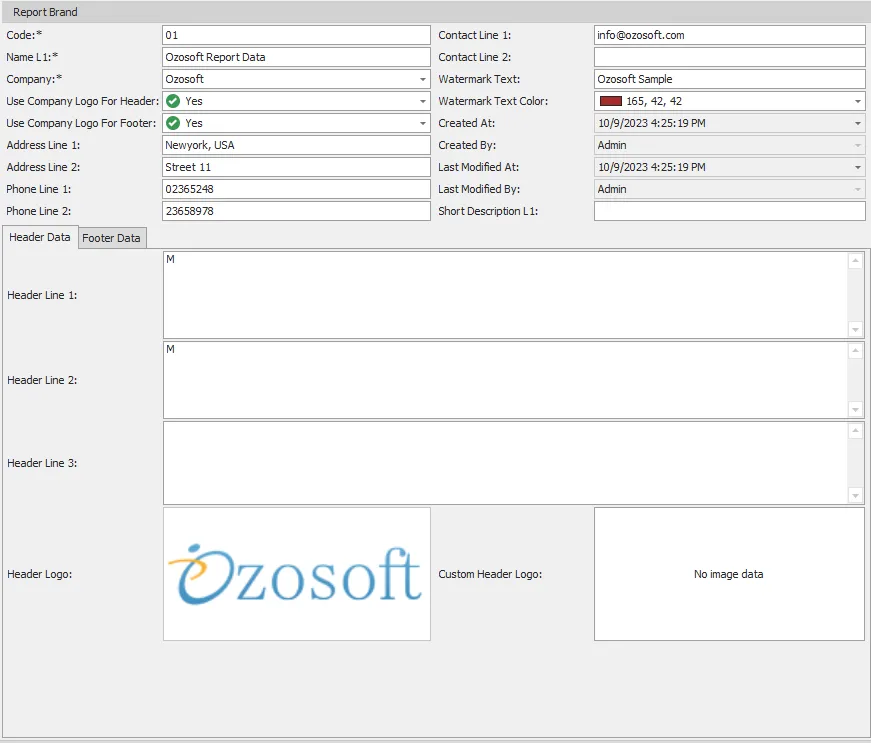
figure 1
| # | Field | Description |
|---|---|---|
| 1 | Code | Report data code (e.g., 05) this field should be unique and shouldn’t be empty |
| 2 | Name L1 | Report data name language 1 (e.g., Ozo report data) this field should be unique and shouldn’t be empty |
| 3 | Company | Report data Company shouldn’t be empty |
| 4 | Use Company Logo for header | Yes/No if you need to use logo entered in company data for header or not. |
| 5 | Use Company logo for footer | Yes/No if you need to use logo entered in company data for footer or not. |
| 6 | Address line 1 | Address line 1 that may need in report. |
| 7 | Address line 2 | Address line 2 that may used while designing report. |
| 8 | Phone line 1 | Phone line 1. |
| 9 | Phone line 2 | Phone line 2. |
| 10 | Contact line 1 | Contact line 1 that will put in contact info section in report. |
| 11 | Contact line 2 | Contact line 2 that will put in contact info section in report. |
| 12 | Watermark text | Report Watermark text. |
| 13 | Watermark text color | Report Watermark text color. |
| 14 | Created by | Filled automatically by system with who created this record. |
| 15 | Created At | Filled automatically by system with when created this record. |
| 16 | Last modified by | Filled automatically by system with who modified this record. |
| 17 | Last modified at | Filled automatically by system with who modified this record. |
| 18 | Short description L1 | brief report data description language 1. |
You can add custom data for header and footer from this screen also as (header logo, header lines, footer logo and footer lines). and use it to design reports