

Journal Entry
1. Finance
1.1 Journal Entry
A journal entry records a business transaction in the accounting system for an organization. User can add/delete and edit journal entry from this screen as shown in figure 1.
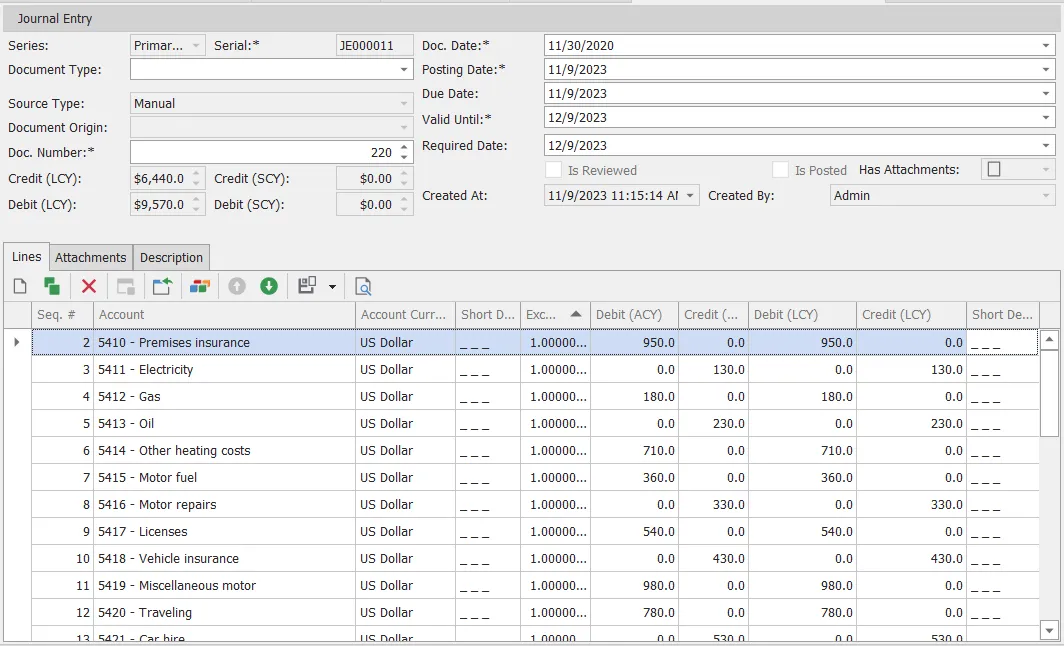
figure 1
| # | Field | Description |
|---|---|---|
| 1 | Series | JE numbering series |
| 2 | Serial | JE serial number, mandatory and unique field |
| 3 | Document Type | JE document type |
| 4 | Source Type | JE source type |
| 5 | Document Origin | JE document origin |
| 6 | Doc. Number | JE document number, mandatory field |
| 7 | Credit (LCY) | Credit by local currency |
| 8 | Debit (LCY) | Debit by local currency |
| 9 | Credit (SCY) | Credit by system currency |
| 10 | Debit (SCY) | Debit by system currency |
| 11 | Doc. Date | JE document date, shouldn’t be empty |
| 12 | Posting Date | JE posting date, mandatory field |
| 13 | Due Date | JE due date |
| 14 | Valid Until | JE valid until date, shouldn’t be empty |
| 15 | Required Date | JE required date |
| 16 | Is Reviewed | Check this box if this je reviewed |
| 17 | Is Posted | Check this box if this je posted |
| 18 | Has Attachments | Check this box if this je has attachments |
| 19 | Created At | Generated automatically by system, contain date when je created |
| 20 | Created By | Generated automatically by system, contain user who create this je |
user can add je lines from this below side of screen, also you can add any je attachments and description of journal entry.