

Lead Scheduled Calls
1. CRM
1.5 Scheduled Calls
CRM employees can schedule leads call usin Ozosoft ERP system. User can add/delete and edit scheduled call from this screen as shown in figure 1.
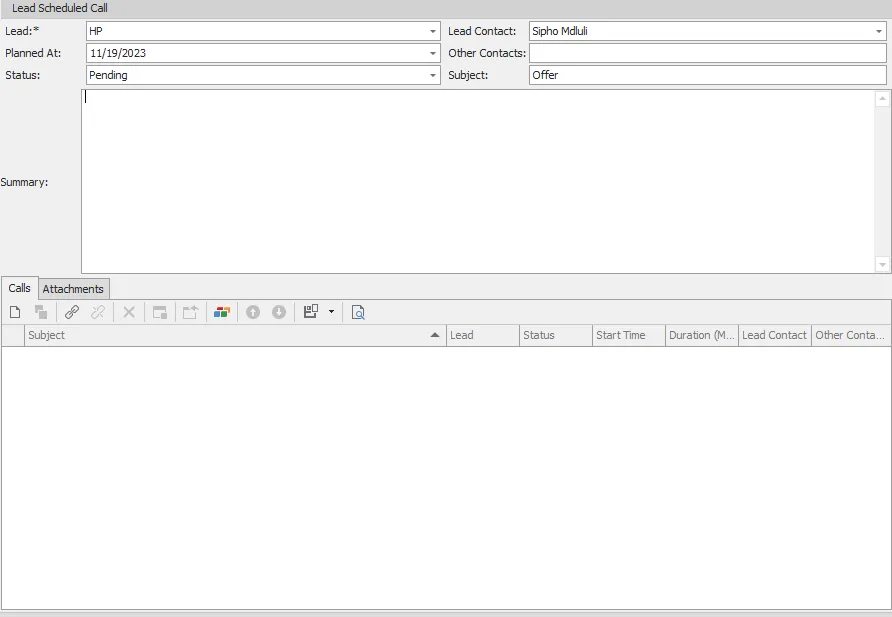
figure 1
| # | Field | Description |
|---|---|---|
| 1 | Lead | Lead who will making a call with, this is mandatory field |
| 2 | Planned At | Scheduled Call planned date |
| 3 | Status | Scheduled Call status, pending, postponed or done |
| 4 | Lead Contact | Lead contact person |
| 5 | Other Contacts | Other lead contacts |
| 6 | Subject | Scheduled call subject |
| 7 | Summary | Call summary after done |
| 8 | Attachments | Call attachments if exist |
you can assign more calls to this scheduled call from this screen also.